A social media MCP is a Model Context Protocol server that lets AI agents publish, engage, and analyze across social platforms through one structured tool interface. Zernio hosts one at mcp.zernio.com with 280+ tools covering 15 social networks and 7 ad platforms. You connect it to Claude Desktop, Cursor, or any MCP-compatible client, and your agent can post to Instagram, read TikTok analytics, or boost a LinkedIn ad without writing a single platform integration.
This guide walks through the actual setup, then five working automations: cross-platform publishing, scheduled posts, analytics pulls, comment and DM management, and ad boosts.
Table of contents
- What is a social media MCP server?
- What is the Zernio MCP and which tools does it expose?
- How do I install and connect the Zernio MCP server?
- How do I post to multiple platforms with one MCP call?
- How do I schedule social posts through the MCP?
- How do I pull analytics for 15 platforms through one MCP?
- How do I read and reply to comments and DMs via MCP?
- How do I boost a post or create ads through the MCP?
- How do I manage multiple accounts with one MCP?
- FAQ
What is a social media MCP server?
A social media MCP server is a Model Context Protocol endpoint that exposes the actions of a social media API as typed tools an AI agent can call. The MCP itself is only the interface. The actual posting, commenting, analytics pulling, and ad boosting happens because the MCP server is wired to a social media API that holds the OAuth tokens and talks to each platform.
MCP is Anthropic's open protocol for connecting LLMs to external systems. It standardizes how an agent discovers and calls tools, but it doesn't ship any social media capability on its own. Claude, Cursor, or any other client cannot publish to Instagram, send a WhatsApp DM, or create a Meta ad until they're connected to an MCP server that is itself connected to a social media API like Zernio.
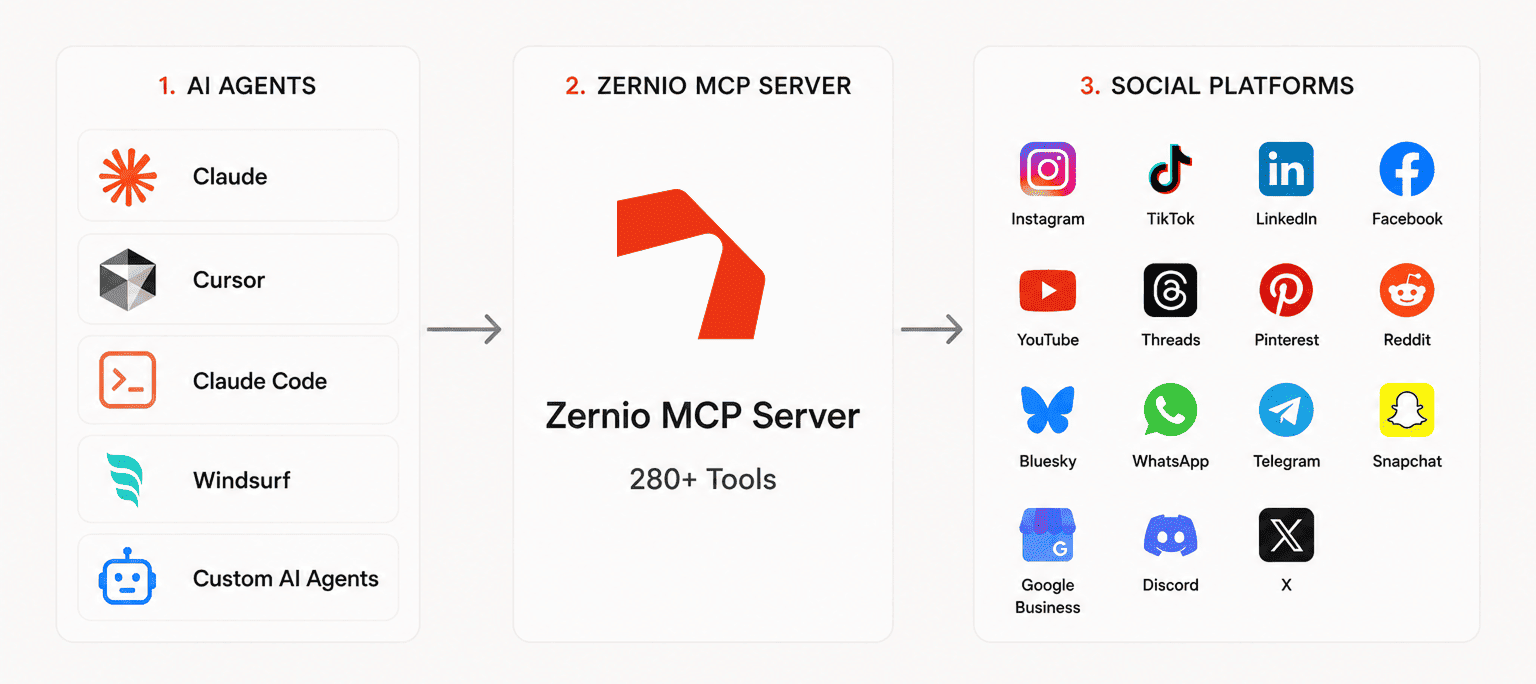
The architecture is three layers:
- The agent (Claude, Cursor, Claude Code, a custom LangChain agent).
- The MCP server, which exposes typed tools and forwards calls to the underlying API.
- The social media API behind the MCP, which holds OAuth credentials, normalizes media, manages rate limits, and makes the real calls to Instagram, TikTok, LinkedIn, and so on.
Without layer 3, the agent has nothing to act on.
What is the Zernio MCP and which tools does it expose?
The Zernio MCP server is a hosted Model Context Protocol endpoint at mcp.zernio.com that exposes 280+ tools across Zernio's five API products: posting, comments, DMs, analytics, and ads. It works with Claude Desktop, Claude Code, Cursor, Windsurf, and any MCP-compatible client. Authentication is a single bearer token from your Zernio dashboard.
Tools are grouped by resource. The ones you'll use most:
| Resource group | Sample tools | What they do |
|---|---|---|
accounts_* | accounts_list, accounts_get_account_health | Discover connected social accounts and check OAuth state |
posts_* | posts_create, posts_cross_post, posts_publish_now, posts_list | Create, schedule, cross-post, list posts |
analytics_* | analytics_get_analytics, analytics_get_best_time_to_post | Pull unified performance metrics across platforms |
comments_* | comments_list_inbox_comments, comments_reply_to_inbox_post | Read and reply to comments |
messages_* | messages_list_inbox_conversations, messages_send_inbox_message | Inbox DMs across 7 platforms |
ads_* | ads_boost_post, ads_create_standalone_ad, ads_get_ad_analytics | Boost organic posts or run paid ads |
media_* | media_generate_upload_link | Upload images and video |
profiles_* | profiles_list, profiles_create | Group accounts by client or brand |
Platforms covered by Zernio MCP: Instagram, TikTok, X, LinkedIn, Facebook, YouTube, Threads, Pinterest, Reddit, Bluesky, WhatsApp, Telegram, Snapchat, Google Business, and Discord. Ads cover Meta, Google, TikTok, LinkedIn, Pinterest, and X.
How do I install and connect the Zernio MCP server?
You connect to the Zernio MCP in three steps: grab an API key, add an MCP entry to your client's config, then restart the client. There's no local server to run, the endpoint is hosted. First 2 connected social accounts are free, so you can test the full flow without paying.
1. Get your API key. Sign up at zernio.com/signup, open the dashboard, go to API Keys, and create one.
2. Add the MCP to your client config. For Claude Desktop, edit ~/Library/Application Support/Claude/claude_desktop_config.json on macOS or the equivalent on Windows:
{
  "mcpServers": {
    "zernio": {
      "command": "npx",
      "args": [
        "-y",
        "mcp-remote@latest",
        "https://mcp.zernio.com/mcp",
        "--header",
        "Authorization: Bearer your_api_key_here"
      ]
    }
  }
}
For Cursor, add the same block to ~/.cursor/mcp.json. For Claude Code, run claude mcp add zernio https://mcp.zernio.com --header "Authorization: Bearer YOUR_ZERNIO_API_KEY".
Docs link: Connect AI assistants to the Zernio API using MCP
3. Restart the client. Once it reloads, the agent sees all 280+ Zernio tools. Test with: "List my connected Zernio accounts." The agent should call accounts_list and return your social accounts.
How do I connect social accounts to Zernio so the MCP can use them?
Installing the MCP gives your agent the tool list. To actually publish, your Zernio workspace needs at least one social account connected (Instagram, TikTok, LinkedIn, and so on). The MCP doesn't hold the OAuth tokens; Zernio does, and the MCP calls forward to those connected accounts.
You have two ways to connect accounts:
Option 1: Connect your own accounts from the dashboard. Open zernio.com/dashboard, go to Connections → New Connection, and run the flow for each platform. This is the right path if the accounts belong to you or your team (your agency's clients, your startup's official handles). First 2 accounts are free.
Option 2: Let end-users connect their own accounts via OAuth-as-a-service. If you're embedding Zernio inside a SaaS product, you don't want to run OAuth flows yourself. The agent (or your app) calls connect_get_connect_url to generate a one-time link, sends the user there, and Zernio handles the rest. The connected account is then scoped to that user's profile inside your workspace.
{
  "tool": "connect_get_connect_url",
  "arguments": {
    "platform": "instagram",
    "profile_id": "prof_user123",
    "redirect_url": "https://yourapp.com/connected"
  }
}
Once accounts exist, the agent confirms what's available:
{ "tool": "accounts_list", "arguments": {} }The response gives one entry per connected account, each with an account_id, the platform, the handle, and the connection status. Those IDs are what the posting, comments, analytics, and ads tools refer to. With at least one connected account, the agent can start publishing.
How do I post to multiple platforms with one MCP call?
To post one piece of content to multiple platforms, the agent calls posts_create with platforms set to an array and content as a single object. Zernio's protocol layer transforms the content for each network's spec, then publishes through official APIs.
Example agent prompt:
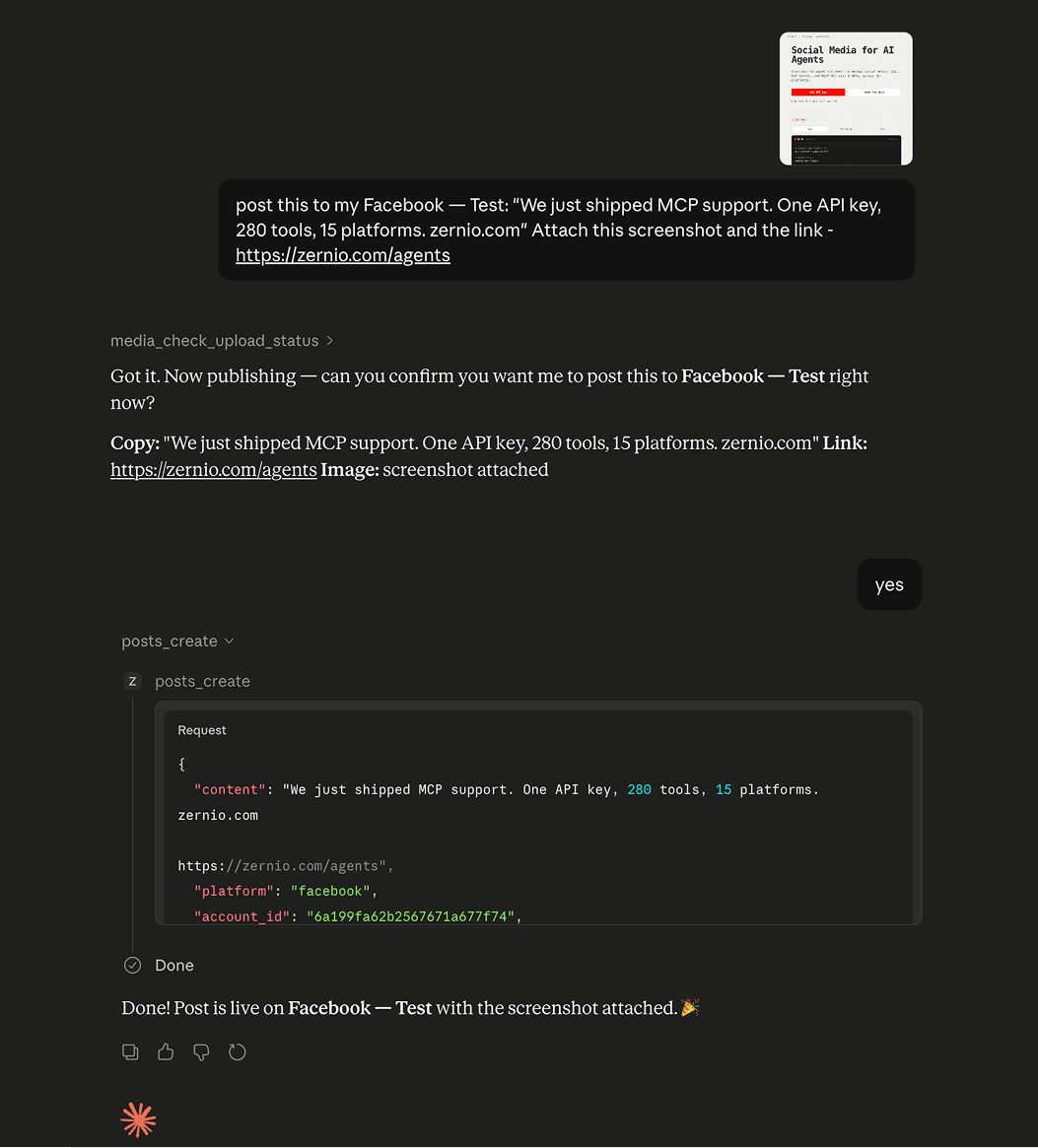
Post this to my Instagram, LinkedIn, and X: "We just shipped MCP support. One API key, 280 tools, 15 platforms. zernio.com" Attach this screenshot {attach the image file to the chat}.
Zernio handles the format normalization in the background: it crops the image for Instagram's feed ratio, trims the caption for X if needed, and attaches the link card for LinkedIn. The response includes a post_id per platform plus the live URLs, so the agent can store them or report back to the user.
Easily prompt social media posting in Claude Chat:
Stop building social integrations from scratch.
One API call to publish, schedule, and manage posts across 17 platforms.
How do I schedule social posts through the MCP?
To schedule a post, replace publish_at: "now" with an ISO timestamp or add this agent prompt in chat — Schedule a LinkedIn post for tomorrow at 9am: "Excited to announce our Series A funding!" The post lands in Zernio's queue and publishes through the platform's API at the scheduled time.
For recurring schedules, combine queue_create_queue_slot (set a weekly time slot like "Mondays 9am UTC") with queue_get_next_queue_slot (drop a post into the next available slot). This is the agent-friendly way to build "post this whenever the next queue slot opens" workflows.
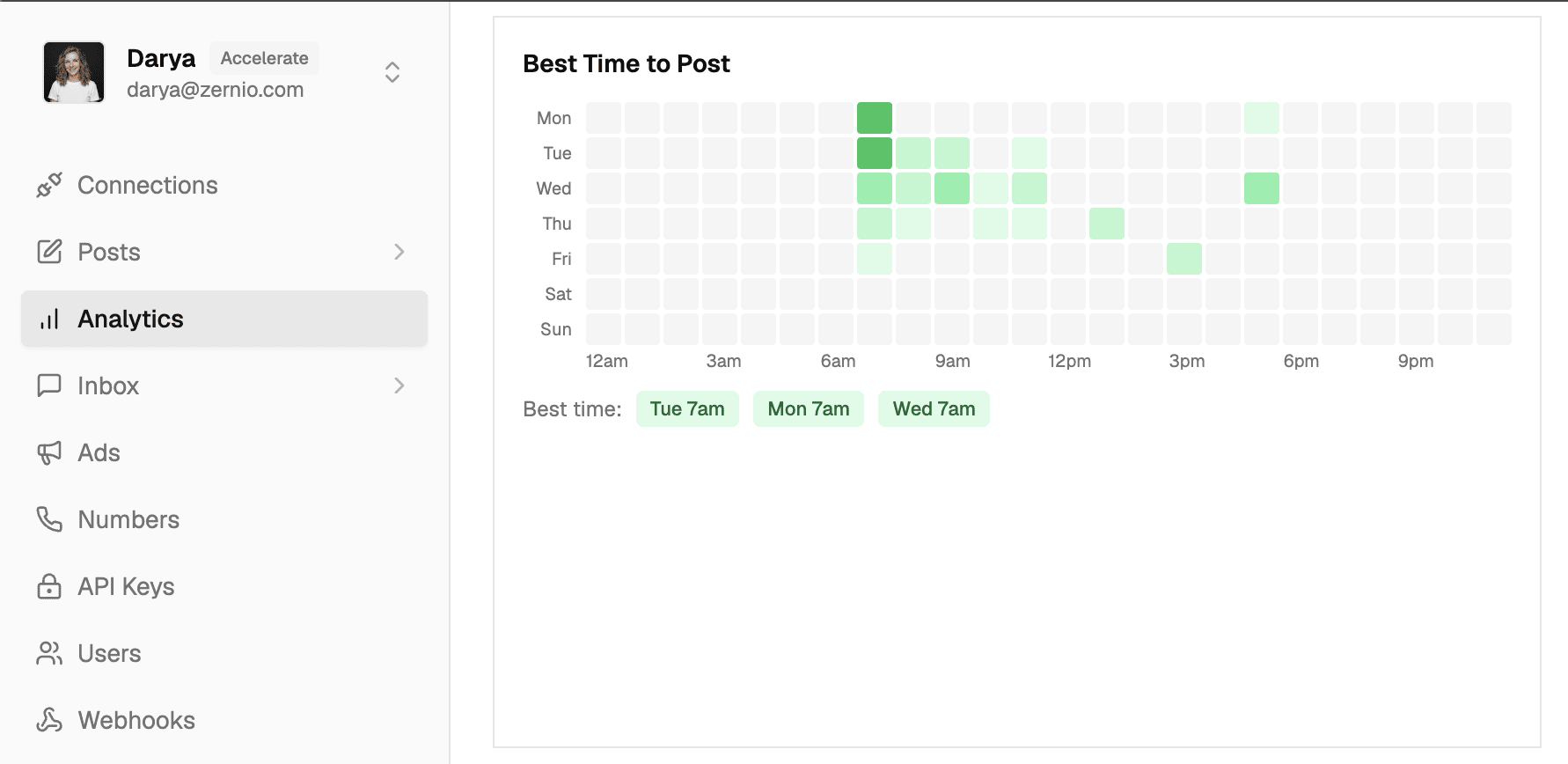
To find the best time per platform automatically, the agent can call analytics_get_best_time_to_post before scheduling. Zernio returns a ranked list of windows based on your historical engagement, which the agent uses to pick publish_at.
How do I pull social media analytics through one MCP?
To pull analytics, the agent calls analytics_get_analytics with an account ID and a date range. The response includes impressions, reach, engagement, and follower change in one shape regardless of platform.
For per-post performance, use analytics_get_post_timeline with a post_id. For platform-specific deep cuts, Zernio exposes typed tools like analytics_get_instagram_demographics, analytics_get_tik_tok_account_insights, analytics_get_you_tube_demographics, and analytics_get_linked_in_post_analytics.
The agent picks the right one based on the question the user asked.
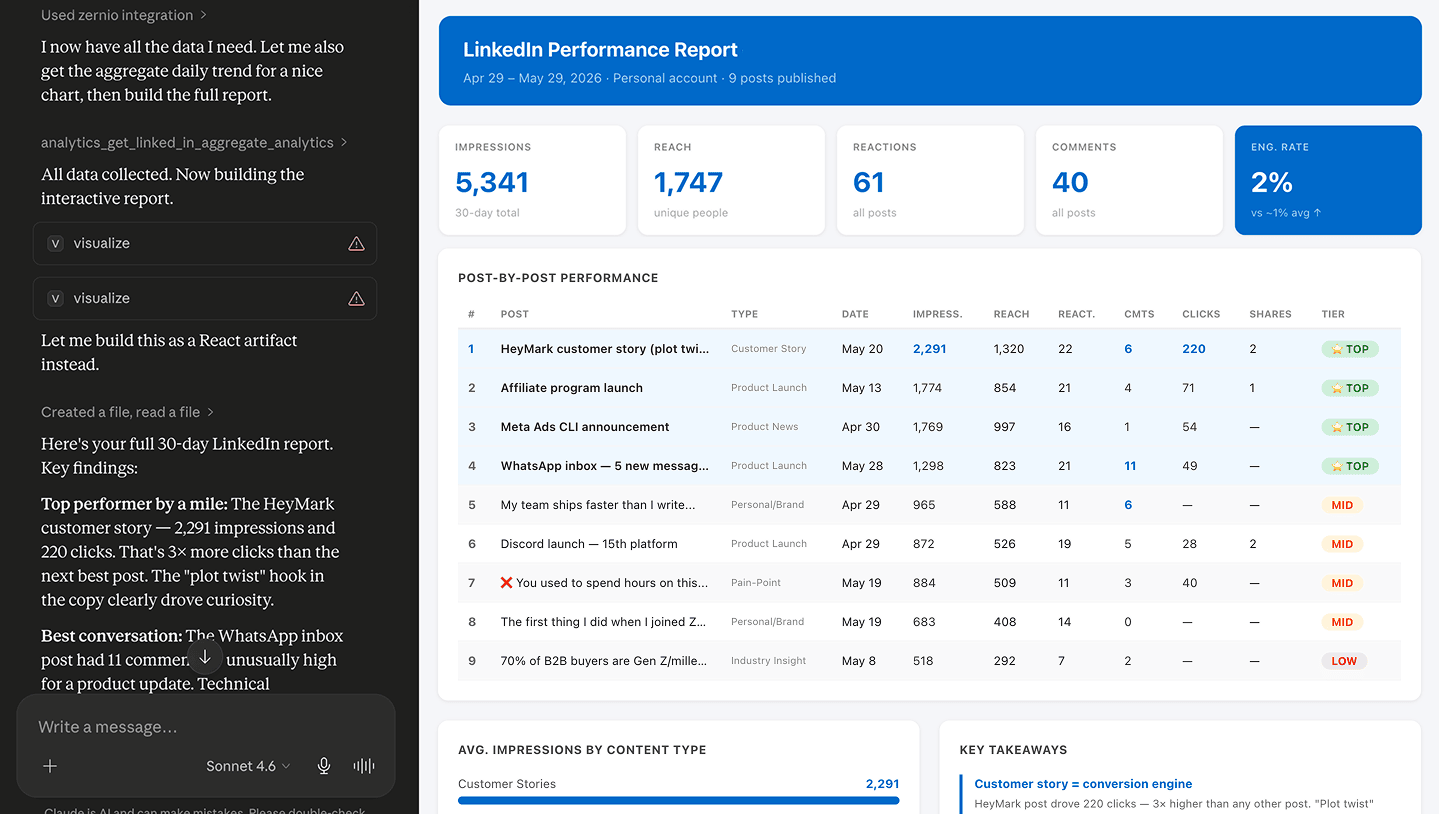
A common pattern: the agent runs posts_list to find the last 30 posts, calls analytics_get_post_timeline on each, then groups results by platform and reports the top three by engagement. That's a Monday morning report that used to take 90 minutes of manual screenshotting.
How do I read and reply to comments and DMs via MCP?
To manage engagement, the agent uses two resource groups: comments_* for public comments and messages_* for private DMs. Both are unified across platforms.
Read recent comments across every connected account:
{
  "tool": "comments_list_inbox_comments",
  "arguments": { "limit": 50, "filter": "unread" }
}
Reply to a specific comment:
{
  "tool": "comments_reply_to_inbox_post",
  "arguments": {
    "comment_id": "cmt_a1b2...",
    "text": "Thanks for the question, DMing you the details now."
  }
}
For DMs, the flow is messages_list_inbox_conversations → messages_get_inbox_conversation_messages → messages_send_inbox_message. This works across Instagram, X, Facebook Messenger, WhatsApp, Telegram, Reddit, and Bluesky from the same tool list.
A useful agent loop: comment monitor sees a question with the word "pricing", calls comments_send_private_reply_to_comment to start a DM thread, then messages_send_inbox_message to send the pricing page link. The full comment-to-DM workflow is built on these three tools.
How do I boost a post or create ads through the MCP?
For paid promotion, the agent calls ads_boost_post to promote an organic post, or ads_create_standalone_ad to build a new ad from scratch. Ads cover Meta, Google, TikTok, LinkedIn, Pinterest, and X.
Boost an organic post that's performing well:
{
  "tool": "ads_boost_post",
  "arguments": {
    "post_id": "pst_xyz...",
    "platform": "facebook",
    "budget": { "daily_amount": 25, "currency": "USD" },
    "duration_days": 7,
    "objective": "engagement"
  }
}
To close the loop, the agent can pull ads_get_ad_analytics 24 hours later, check the CTR, and either extend the campaign or kill it. That's the autonomous "publish, watch, double down on winners" pattern that's hard to build by hand across six ad APIs.
How do I manage multiple accounts with one MCP?
For agencies or SaaS apps managing accounts on behalf of clients, Zernio uses profiles (groups of accounts under one client or brand). The agent calls profiles_list to see them, then accounts_list with a profile_id filter to see accounts inside.
{
  "tool": "accounts_list",
  "arguments": { "profile_id": "prof_clienta..." }
}
When publishing for a specific account, always pass account_id to posts_create so the agent doesn't post to the wrong handle. If you skip it and the user has multiple accounts on the same platform, Zernio returns an error listing the candidate IDs, and the agent picks the right one and retries.
This makes the MCP usable for production agency workflows: one MCP connection can drive 80 client accounts with zero ambiguity.
FAQ
What is a social media MCP server? A social media MCP server is a Model Context Protocol endpoint that exposes social platform actions as typed tools an AI agent can call. The agent uses one tool list (post, comment, analyze, boost) instead of learning 15 platform APIs.
Where is the Zernio MCP hosted? The Zernio MCP is hosted at mcp.zernio.com. You don't need to run a local server. Authentication is a bearer token from your Zernio dashboard.
How many tools does the Zernio MCP expose? The Zernio MCP exposes 280+ tools covering posting, scheduling, analytics, comments, DMs, ads, account management, and webhooks across 15 social platforms and 7 ad platforms.
Is the Zernio MCP free? The Zernio MCP itself has no separate fee. You pay for connected accounts: first 2 free, then $6/account/month for accounts 3 to 10, $3 for 11 to 100, and $1 for 101 to 2,000. Every feature is included.